The Ultimate Guide to PlayStation 2 Accessories
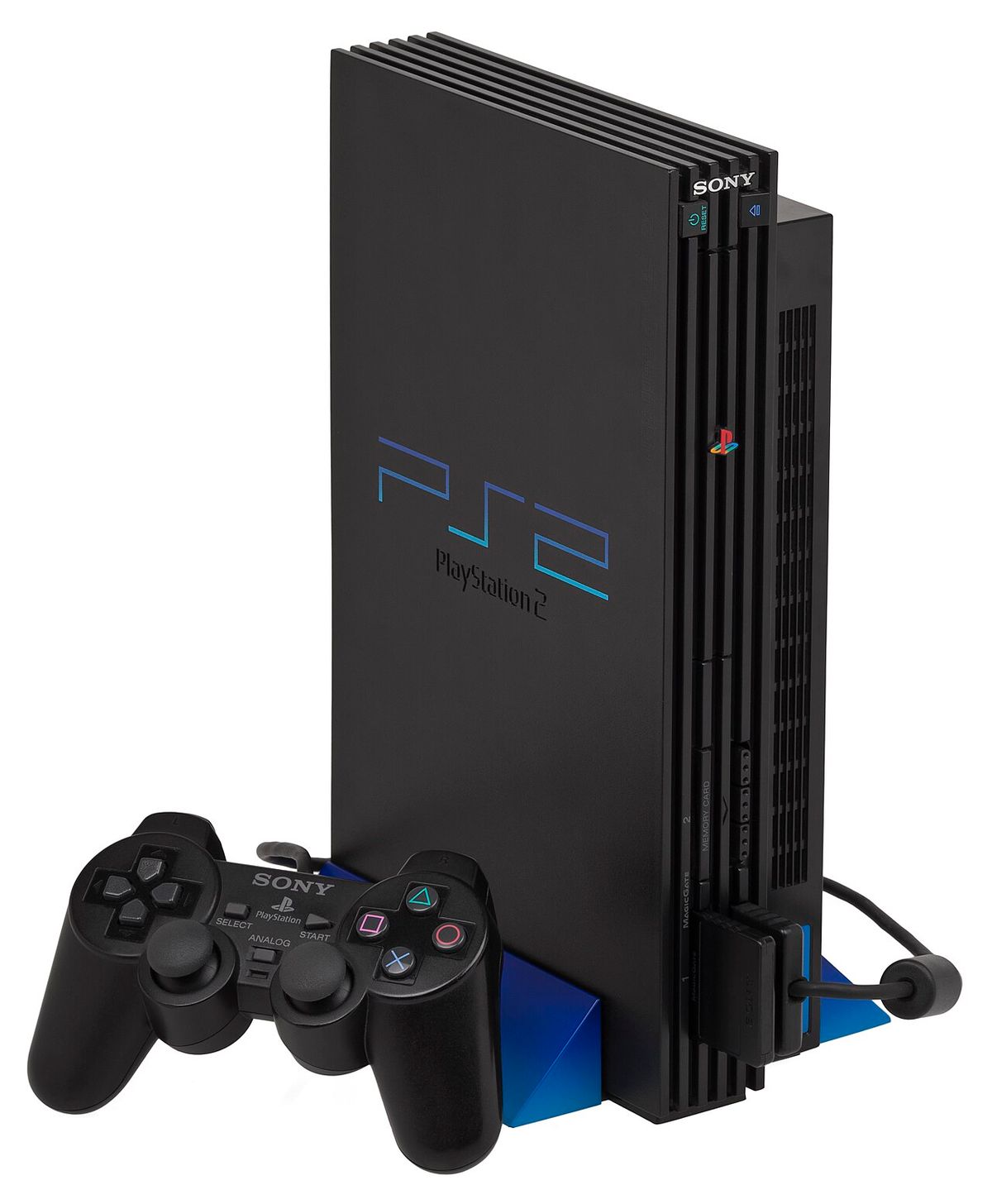
The PlayStation 2 was far more than a console with two controller ports. Across its long life, Sony and third-party manufacturers produced an extraordinary range of accessories that could turn the PS2 into a four-player party machine, a karaoke system, a motion-controlled playground, an online console, a racing setup, a DVD player and even, with the right hardware, a Linux computer.
Part of what made the PlayStation 2 era so memorable was the sheer variety of ways you could use the machine. The standard DualShock 2 was only the beginning. There were official memory cards, Multitaps, DVD remotes, cameras, microphones and networking hardware, while games such as Guitar Hero, SingStar, Buzz!, Time Crisis and Gran Turismo inspired their own specialist controllers.
Some PS2 accessories were genuinely useful. Others were gloriously excessive. A few helped shape features that later became normal across the games industry.
This guide covers the most important official and third-party PlayStation 2 accessories, what they did, which consoles they worked with, and which are still worth owning today.
Compatibility note: PS2 accessories are not universally interchangeable across every console revision. Fat and Slim consoles can differ, and some accessories have model-specific versions. Always check the model number of your console and accessory before buying.
PS2 Accessories at a Glance
| Accessory | Main purpose | Still useful today? |
|---|---|---|
| DualShock 2 | Standard game controller | Yes — essential |
| 8MB Memory Card | Saving PS2 game data | Yes — essential for most games |
| Multitap | Three-, four- and in some games larger local multiplayer setups | Yes, for supported multiplayer games |
| Network Adaptor | Ethernet/network connection on compatible Fat PS2 models | Useful for enthusiasts and networking projects |
| 40GB HDD | Game installations, selected software and Linux | Mainly collector/enthusiast interest |
| DVD Remote | Controlling DVD playback | Optional but nostalgic and convenient |
| EyeToy | Camera-based motion gaming | Yes, for EyeToy titles |
| SingStar microphones | Karaoke and music games | Yes, especially for party setups |
| Buzz! buzzers | Quiz-game controls | Yes, for Buzz! games |
| Guitar controller | Guitar Hero and compatible rhythm games | Yes |
| Racing wheel | Driving games | Yes, particularly for Gran Turismo |
| Light gun | Gun games such as Time Crisis | Yes, but traditional models normally require a CRT television |
1. DualShock 2: The Essential PS2 Controller
The DualShock 2 is the controller most closely associated with the PlayStation 2. At first glance it looks extremely similar to the original DualShock, but Sony refined the design for its new console.
It retained the now-familiar twin analogue sticks, D-pad, four face buttons, shoulder buttons and dual vibration motors. The important difference was that the DualShock 2 could detect different levels of pressure on several of its buttons, allowing compatible games to respond to how firmly a button was pressed. Sony's own history of the controller highlights the improved analogue control and pressure-sensitive face buttons.
Not every PS2 game made meaningful use of pressure sensitivity, but titles such as Metal Gear Solid 2 and parts of the Gran Turismo experience demonstrated what it could add.
For anyone building a PS2 setup today, an original DualShock 2 in good condition remains one of the safest controller choices. Age is now the biggest issue: worn analogue sticks, tired rubber membranes, damaged cables and sticky buttons are increasingly common.
What to Check When Buying a DualShock 2
- Both analogue sticks should centre correctly and move smoothly.
- L3 and R3 should click reliably.
- All face and shoulder buttons should register consistently.
- Check that vibration works.
- Inspect the cable where it enters the controller and connector.
- Be cautious of modern replicas being sold as genuine Sony controllers.
2. PS2 Memory Cards: The Accessory Almost Everyone Needed
For most of the PS2 generation, saving your progress meant owning a Memory Card (8MB) for PlayStation 2. Sony's official PS2 card provides approximately 8MB of storage and uses its MagicGate technology.
Eight megabytes sounds tiny now, but PS2 save files were generally small enough for one card to hold data from numerous games. The exact number varied substantially: some saves required only a few dozen kilobytes, while others could consume much more.
A critical point is that PS2 and PS1 memory cards are different. PS2-format game saves are stored on a PS2 memory card, while original PlayStation games use an original PlayStation memory card. A PS2 console may play compatible PS1 games, but that does not mean those games save directly to the PS2's 8MB card.
Official vs Third-Party Memory Cards
Official Sony cards are 8MB. Over the years, third-party cards appeared in much larger advertised capacities. Some work perfectly well, but reliability varies considerably, especially with unbranded or cheaply manufactured cards.
For valuable childhood saves or a serious collection, a genuine Sony 8MB card is still a sensible choice. Modern enthusiast storage solutions can be useful too, but they should be treated as a separate category from an original official memory card.
Can PS2 Memory Cards Fail?
Yes. They are old electronic storage devices now, and data corruption can happen. If a save is irreplaceable, keeping another copy is wise. Enthusiast tools and modern adapters can make backing up saves much easier than it was during the console's original life.
3. The PlayStation 2 Multitap: Turning Two Ports into a Party
The standard PS2 has two controller ports, which sounds limiting for a console with so many multiplayer games. The Multitap solved that problem by allowing multiple controllers and memory cards to connect through a single port.
With compatible games, this opened the door to four-player sessions and, in certain titles and configurations, even larger local multiplayer games using two Multitaps.
It was ideal for sports games, wrestling, party games and other couch-multiplayer favourites. For many households, a Multitap transformed the PS2 from a one- or two-player system into the centre of a proper multiplayer night.
Important: There Are Different PS2 Multitaps
This is one accessory where model compatibility really matters. Sony produced different Multitap versions for different PS2 chassis designs, and later Slim systems require the appropriate version. Do not assume that any accessory labelled “PS2 Multitap” is suitable for every console.
4. PS2 Network Adaptor: Bringing the Console Online
Long before online console gaming became an expectation, the PS2 gained network functionality through the Network Adaptor. On compatible original “Fat” PS2 models, the unit attaches at the rear of the console and provides the hardware needed for network play.
Sony's PlayStation history records the Network Adaptor as an important early step into online console gaming. Sports games, shooters, racers, RPGs and other genres eventually supported online play.
Depending on region and model, original adaptors could offer Ethernet and, in some markets, modem functionality. The later Slim PS2 changed the situation significantly because Ethernet networking was built into the console itself, removing the need for the original expansion-bay Network Adaptor.
Why the Network Adaptor Still Matters
Official PS2 online services are largely a historical story now, but the adaptor remains interesting to collectors and enthusiasts. Community-run servers and home-network projects have kept portions of PS2 online gaming alive, while the original Fat-model adaptor is also closely tied to hard-drive use.
5. The PS2 Hard Disk Drive: Sony's 40GB Upgrade
Yes, the PlayStation 2 had an official hard drive.
Sony released a 40GB internal Hard Disk Drive for compatible expansion-bay PS2 consoles. In North America it became particularly associated with Final Fantasy XI, which used both the HDD and Network Adaptor. Sony also included a 40GB HDD in its official PlayStation 2 Linux Kit.
The original Fat PS2's rear expansion bay makes the hardware surprisingly PC-like by console standards. The HDD was never a universal requirement for PS2 gaming, however. Support was limited, varied by region and game, and Slim PS2 systems removed the large expansion bay altogether.
Today the official HDD is primarily interesting as a piece of PS2 history. Enthusiasts have since found far broader uses for hard drives and storage adapters in compatible Fat consoles than Sony originally offered commercially.
6. DVD Remote Control: When the PS2 Doubled as the Family DVD Player
DVD playback was one of the PS2's biggest selling points, and Sony offered a dedicated DVD Remote Control to make movie playback feel more like using a conventional home DVD player.
Early versions worked with an infrared receiver connected to the console. Later PS2 revisions incorporated infrared support, meaning the separate receiver was no longer needed with the appropriate remote and console model.
The remote included normal DVD functions such as play, pause, chapter navigation and menu controls, alongside PlayStation-style controls.
It is not essential today — a DualShock 2 can operate DVD playback — but it remains one of the accessories that best illustrates just how central the PS2 became to living-room entertainment.
That role also helps explain why the PlayStation 2 was such a big deal: for many households it wasn't only a games console.
7. EyeToy: Years Before Kinect, Your Body Became the Controller
The EyeToy was one of the most distinctive PlayStation 2 accessories ever released. The USB camera captured the player and allowed specially designed games to interpret movement as input.
Sony launched EyeToy for PS2 in 2003. Games such as EyeToy: Play put players directly on screen, asking them to wave, punch, move and react rather than simply press buttons. Other PS2 games offered optional EyeToy features.
The technology looks simple by modern standards, but its effect at the time was striking. Sony later credited lessons learned from EyeToy as an influence on the development of PlayStation Move.
Why EyeToy Mattered
- It helped make motion-controlled gaming accessible to non-traditional players.
- It turned the player's physical movement into input without a handheld controller.
- It became a strong social and party-game accessory.
- It foreshadowed later camera and motion systems.
For a retro PS2 collection, EyeToy is still inexpensive enough in many markets to be worth owning purely because it represents such a distinctive part of the console's identity.
8. SingStar Microphones: Turning the PS2 into a Karaoke Machine
SingStar arrived on PS2 in 2004 and helped broaden the console's audience even further. Instead of a traditional controller, players performed into dedicated microphones.
The familiar wired SingStar microphones were commonly supplied as a pair and connected through a USB converter. Later wireless microphone options also appeared.
This was exactly the sort of accessory that made the PS2 such a social machine. A group did not need to understand combos, analogue-stick camera controls or complicated game rules. Pick a song, grab a microphone and sing.
For anyone rebuilding a party-focused PS2 setup today, a pair of compatible SingStar microphones remains one of the most entertaining additions.
9. Buzz! Buzzers: The Controller Designed Like a Game-Show Prop
The Buzz! series brought television-style quizzes to PS2, and its dedicated buzzer controllers were a huge part of the appeal.
Each handheld unit featured a large red buzzer and coloured answer buttons. Rather than passing standard controllers around, players had something that immediately made sense in the context of a quiz show.
It was a brilliant example of PS2-era peripheral design: make the controller fit the game instead of forcing the game to fit a standard controller.
Original USB Buzz! controllers can still be worth picking up if you plan to play the PS2 quiz titles, particularly because they make multiplayer sessions feel much closer to the intended experience.
10. Guitar Hero Controllers: Plastic Guitars That Became a Phenomenon
The original Guitar Hero launched on PS2 in 2005, and the guitar-shaped controller became inseparable from the series.
Instead of standard face buttons, players used coloured fret buttons, a strum bar and whammy bar to play along with the music. It was immediate, theatrical and perfect for playing in front of other people.
The success of Guitar Hero helped trigger a huge rhythm-game boom. For a period, oversized plastic instruments became one of the most recognisable sights in gaming.
Buying a PS2 Guitar Controller Today
Check exactly how the guitar connects. Some PS2 guitars use the standard controller connection, while others rely on wireless receivers. A guitar without its required receiver may be effectively useless unless a compatible replacement can be found.
11. Dance Mats: When the Living Room Became an Arcade
Dance mats were another perfect example of the experimental PS2 era. Titles in the Dance Dance Revolution/Dancing Stage family and other rhythm games let players step on directional panels in time with music.
Soft foldable mats were the most common home option. More substantial third-party platforms also appeared for players who wanted something closer to an arcade cabinet's feel.
They take up far more floor space than a DualShock, but that's precisely the point. Like EyeToy, SingStar and Guitar Hero, the dance mat turned gaming into a physical and social activity.
12. Racing Wheels: The Best Way to Experience PS2 Driving Games?
The PS2 has one of the strongest racing libraries of any console, so it is no surprise that steering wheels became major accessories.
Logitech's Driving Force family became especially closely associated with PlayStation racing, while the Driving Force Pro is remembered by many Gran Turismo fans as one of the standout wheels of the period.
A good force-feedback wheel could dramatically change games such as Gran Turismo 3 and Gran Turismo 4, adding steering resistance and physical feedback that a standard controller could not reproduce in the same way.
What to Check Before Buying an Old PS2 Wheel
- Confirm that the exact wheel is compatible with the game you want to play.
- Make sure the pedals are included.
- Check whether an external power supply is required.
- Verify that force feedback still works.
- Inspect clamps and mounting hardware.
13. Light Guns: GunCon 2, Time Crisis and the Crt Problem
For arcade-style shooters, few accessories feel more authentic than a light gun. The PS2 era included the GunCon 2, strongly associated with Namco's Time Crisis games, alongside a range of third-party light guns.
The catch for modern players is display technology.
Traditional light guns were designed around the behaviour of CRT televisions. Most do not work normally with modern LCD, LED or OLED displays because those screens do not scan the image in the same way.
That means a proper retro light-gun setup usually requires a compatible CRT television, the correct cables and the correct gun for the game and region.
If you have the space for a CRT, however, light-gun games remain one of the experiences that emulation and modern flat-panel displays struggle to reproduce exactly like the original hardware.
14. Arcade Sticks and Specialist Controllers
The PS2's enormous fighting-game library created a healthy market for arcade sticks. Companies including Hori produced sticks aimed at games such as Tekken, Street Fighter, Virtua Fighter and other arcade-style releases.
There were also specialist controllers for particular games and genres. This is where PS2 collecting gets wonderfully strange.
Among the better-known novelty peripherals were controllers shaped around individual games, including the famously extravagant Resident Evil 4 chainsaw controller and the katana-style controller associated with Onimusha 3.
These were not practical everyday controllers. That is exactly why collectors love them.
The PS2 generation came from an era when publishers were remarkably willing to put unusual pieces of plastic on shop shelves if they thought it would make a game stand out.
15. USB Keyboards, Mice and Headsets
The USB ports on the front of the PS2 opened the door to accessories that felt much more like PC peripherals.
USB keyboards could be useful in online titles and software where typing mattered. Sony's official PlayStation 2 Linux package even included a USB keyboard and mouse as part of the complete computer-like setup.
USB headsets also became relevant as online gaming expanded. SOCOM is particularly associated with voice communication on PS2, showing how console multiplayer was beginning to move toward the always-connected style that would dominate later generations.
Compatibility was software-dependent, so a USB device working physically with the console does not mean every game knows what to do with it.
16. PS2 Video Cables: One of the Most Important Upgrades Today
Not every useful accessory changes how a game is controlled. For modern PS2 owners, the right video connection can make a major difference to picture quality.
Sony sold several types of AV cable during the PS2 era, including composite, S-Video and component video options in supported markets.
Common PS2 Video Connections
- Composite: the familiar yellow video connector. Widely compatible but generally the softest-looking option.
- RGB SCART: especially relevant in Europe and capable of a much cleaner image on compatible displays.
- S-Video: a useful improvement over composite where supported.
- Component video: an excellent analogue option and particularly useful for games that support progressive scan.
Modern televisions complicate matters because many no longer accept the analogue connections the PS2 was designed around. That has created a large market for HDMI adapters and scalers.
Quality varies enormously. A cheap “PS2 to HDMI” dongle can be convenient, but it is not automatically the best-looking or lowest-latency solution. Serious retro setups often use high-quality cables with a dedicated scaler designed for older consoles.
17. Vertical Stands, Horizontal Stands and Cosmetic Accessories
The original PS2 was deliberately designed to look at home either horizontally or vertically, and Sony produced official stands to support different orientations and console revisions.
These are simple accessories, but they have become desirable additions for collectors who want a period-correct display.
Again, check model compatibility carefully. A stand designed around one chassis shape may not fit another, and Sony's own later PS2 documentation explicitly lists certain older stands and accessories as incompatible with newer console models.
Controllers and memory cards also appeared in numerous colours, giving owners a way to match limited-edition or region-specific hardware.
18. Third-Party PS2 Accessories: From Brilliant to Bizarre
The official Sony catalogue only tells half the story.
The PS2's enormous installed base encouraged a vast ecosystem of third-party accessories. Electronics shops and game retailers filled shelves with controllers, extension cables, wireless pads, memory cards, cooling products, steering wheels, light guns, dance mats, arcade sticks and carry cases.
Quality ranged from excellent to terrible.
Some third-party companies produced genuinely impressive hardware. Logitech's better PS2 peripherals, for example, are still sought after. Other accessories were cheap substitutes that never felt as precise or durable as Sony's originals.
Wireless PS2 Controllers
Wireless controllers are particularly interesting because the standard DualShock 2 remained wired. Third-party manufacturers offered radio-frequency wireless pads, usually requiring a receiver connected to the controller port.
A well-preserved quality wireless controller can be useful for a modern living-room setup, but missing receivers are a common problem when buying second-hand.
Controller Extension Cables
Sometimes the least glamorous accessory is the most useful. PS2 controller extension leads were inexpensive and solved a very real problem for players sitting farther from the television.
They remain useful today, especially if a retro setup places the console near a CRT or scaler but the player sits several metres away.
19. Can You Use PlayStation 1 Accessories on a PS2?
Sometimes, but not universally.
The PS2 was designed with substantial backwards compatibility, and certain original PlayStation controllers and accessories can work in appropriate situations. However, compatibility depends on both the accessory and the game.
An original DualShock can be usable with some PS2 software, but PS2 games that rely on DualShock 2-specific features may not behave correctly. Sony's own manuals advise using a DualShock 2 where required.
Memory cards are even clearer: PS1 games use PS1 memory cards and PS2 games use PS2 memory cards.
Do not assume that because an accessory physically fits into the port it will function correctly with every PS2 game.
20. PS2 Fat vs PS2 Slim: Accessory Compatibility Explained
The change from the original PS2 chassis to the smaller Slim models affected more than appearance.
| Feature/accessory | Original/Fat PS2 | PS2 Slim |
|---|---|---|
| DualShock 2 | Yes | Yes |
| 8MB PS2 Memory Card | Yes | Yes |
| Network connection | Network Adaptor required on compatible models | Ethernet built into standard Slim design |
| Expansion-bay internal HDD | Supported on compatible Fat hardware | No standard expansion bay |
| Multitap | Use the correct original-model PS2 Multitap | Use the correct Slim-compatible PS2 Multitap |
| DVD infrared receiver | Depends on console revision | Later hardware has integrated infrared support |
| Vertical stand | Model-specific | Model-specific |
The safest rule is simple: check the SCPH model number of both the console and accessory before buying anything model-specific.
21. Buying PS2 Accessories Today: What Should You Look For?
The PS2 launched in 2000, which means even later accessories are now ageing hardware. Condition matters at least as much as brand.
1. Check for Missing Receivers and Adapters
Wireless controllers, microphones and specialist peripherals may rely on dongles or adapters. Sellers sometimes list the main accessory without the part actually required to connect it.
2. Confirm the Exact Model Number
This is especially important for Multitaps, stands, Network Adaptors, DVD remotes and model-specific accessories.
3. Watch for Fake Sony Controllers and Memory Cards
Original-looking replicas exist. A suspiciously new “genuine” DualShock 2 or Sony memory card at a very low price deserves closer inspection.
4. Consider the Display You Use
If you want a light gun, a CRT is usually essential. If you use a modern 4K television, video cables and scaling hardware may be more important to your experience than another controller.
5. Test Old Storage Before Trusting It
Do not immediately move your only copy of an irreplaceable save onto an unknown second-hand card.
6. Buy for the Games You Actually Want to Play
An EyeToy, guitar, dance mat or steering wheel is only valuable if you are interested in the software that supports it. The best PS2 collection is one you actually use.
22. Which PlayStation 2 Accessories Are Actually Essential?
If you have just bought a PS2 and want a practical setup rather than a museum, start here:
- A genuine DualShock 2 — the controller the system was designed around.
- An official 8MB PS2 Memory Card — still the safest straightforward option for normal game saves.
- A good video cable or modern scaling solution — especially important on current televisions.
- A second controller — because local multiplayer is a huge part of the PS2 experience.
- A Multitap — if you intend to play compatible four-player games.
After that, accessories should follow your games.
Love Gran Turismo? Hunt down a good steering wheel. Love Time Crisis and own a CRT? Get a light gun. Want the full mid-2000s party experience? EyeToy, SingStar, Buzz! and Guitar Hero will get you there very quickly.
Why PS2 Accessories Were Such a Big Part of The Console's Success
The PlayStation 2 sold on the strength of its games, brand, DVD playback and huge third-party support, but its accessories reveal something else about the era: the PS2 was unusually adaptable.
One evening it could be a single-player RPG machine. The next it could have four friends connected through a Multitap. It could become a karaoke system, a quiz show, a virtual guitar, a dance floor, a racing rig, a light-gun arcade or a motion-controlled party game.
The Network Adaptor pushed it onto the internet. The HDD gave it local mass storage. EyeToy experimented with camera-based interaction. USB peripherals blurred the boundary between console and PC. The DVD remote reinforced the idea that the PS2 belonged beside the television even when nobody was playing games.
That variety is one reason the PlayStation 2 remains so much fun to collect today. Buying the console is only the beginning.
The accessories show just how enormous — and how wonderfully experimental — the PS2 ecosystem really was.
PlayStation 2 Accessories Faq
What Accessories Do You Need for a PS2?
At minimum, you need a compatible controller and the cables required to connect and power the console. For most PS2 games, an 8MB PS2 Memory Card is also strongly recommended so you can save progress.
What Size Is an Official PS2 Memory Card?
Sony's standard official PlayStation 2 memory card provides approximately 8MB of storage.
Can a PS2 Use a PS1 Memory Card?
Yes, a PS2 can use an original PlayStation memory card for compatible PS1 game saves. PS2-format games require a PS2 memory card.
Can You Connect Four Controllers to a PS2?
Yes. A compatible PS2 Multitap allows supported games to use more than the console's two built-in controller ports. Some games and setups can support even more players with two Multitaps.
Does Every PS2 Need a Network Adaptor to Go Online?
No. Compatible original Fat PS2 models use a Network Adaptor, while Slim PS2 models include an Ethernet network connection as part of the console hardware.
Did the PS2 Have a Hard Drive?
Yes. Sony released an official 40GB internal HDD for compatible original PS2 hardware. It was used by selected software and was also part of Sony's PS2 Linux offering.
Does EyeToy Work on Every PS2 Game?
No. EyeToy works with games specifically designed to support the camera or titles that include optional EyeToy features.
Do PS2 Light Guns Work on Modern Televisions?
Traditional PS2-era light guns generally depend on CRT display behaviour and normally do not work correctly on modern LCD or OLED televisions. A CRT setup is usually required for the original experience.
Can You Use a PS1 Controller on a PS2?
Some original PlayStation controllers work with some PS2 software, but compatibility varies and features specific to the DualShock 2 may be unavailable. A DualShock 2 is the safest choice for PS2 games.
What Is the Best PS2 Accessory to Buy Today?
For general use, a genuine DualShock 2 and reliable official 8MB Memory Card are the most useful. After that, the best accessory depends on your games: a wheel for racing, Multitap for local multiplayer, EyeToy for camera games or specialist controllers for rhythm and arcade titles.
Sources and Further Reading
- PlayStation History: PlayStation 2 generation
- PlayStation Blog: EyeToy, Innovation and Beyond
- PlayStation Blog: The Evolution of the PlayStation Controller
- Sony Interactive Entertainment: Linux for PlayStation 2
- Sony Interactive Entertainment: PS2 8MB Memory Card and DualShock 2
- Sony: PlayStation 2 40GB Internal Hard Disk Drive